
Claude artifacts can now install as standalone apps on Mac and Windows
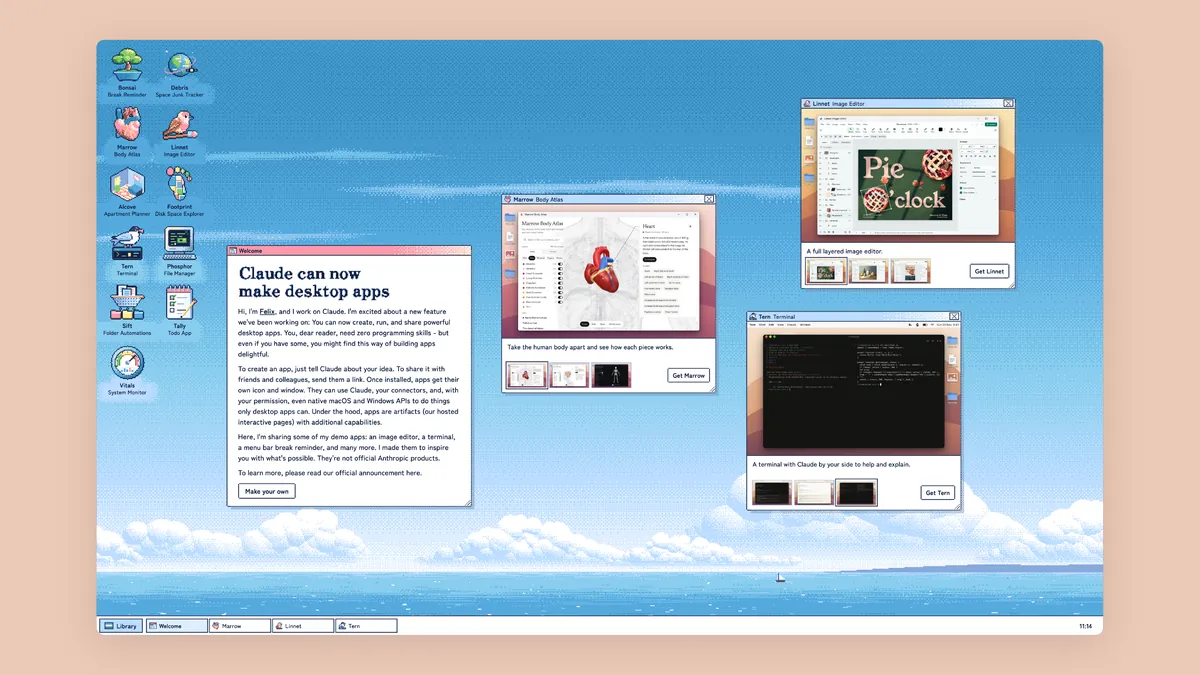
Anthropic has added a beta option that turns a Claude-built artifact into an installed app on Mac and Windows computers. Listed under November 24 in the company's release notes, the change arrived beside two other updates: a monthly recap graduating from beta and a way to move files between Claude and connected apps.
Each installed artifact opens in a separate window with its own icon, outside the main Claude interface. In its announcement, Anthropic said a tool someone relies on for work "should open like the rest of your apps."
Installed apps can call on Claude and on a user's connectors, and edits to the original artifact carry over to the app automatically. Any request an app sends to Claude draws on the subscriber's usage limits.
Under Anthropic's Help Center guide, system access hinges on permissions granted one app at a time. Covered features include notifications, keyboard shortcuts, an icon in the macOS menu bar or Windows system tray, and floating above other windows, which also involves tracking the cursor's position. A fifth level, full computer access, hands an app the power to launch programs and to open, edit or remove files with no prompt for each action.
Approval covers only a single release of an app. Every update, even one the user writes personally, triggers a new permission request from Claude. Code that an app loads from an outside website is an exception and can change with no fresh request.
Warnings appear on apps from creators Claude cannot identify or from outside a user's organization, and Claude generally withholds full access from those. Using the feature requires Claude for Mac or Windows version 6.28899.0 or later, with installation handled through the "Install as app" option in the Share menu.
Team plans have the feature switched on by default, though full access stays off until an admin approves it. Enterprise owners must activate it themselves.
Also dated November 24 is a beta for exchanging files with connected apps. Through it, Claude can push a file to one of those apps or store a file the connected app provides.
Rollout to Pro, Max and Ultra customers is happening in stages, with access for organizations on Team or Enterprise depending on an owner switching it on. Free accounts are due to get it later, the help article states.
Monthly recaps, found in the Reflect section of Settings, are now open to every account on Free, Pro, Max or Ultra. Coverage spans Claude for iOS and Android, Claude Desktop and the web.
Cloud-run Claude Cowork tasks and Claude Code sessions can now feed into a recap. Users who want an old recap gone can erase it from the recap screen.
Computer use reached Team and Enterprise accounts as a beta on November 20, with organizations gaining access gradually. When active, Claude can view a person's screen and operate the desktop programs that person has approved.
Inside Claude Desktop, the feature works within Claude's new interface. Browser and phone users need a setting called Computer access turned on. Organizations find it off by default, according to Anthropic's admin guide.
Google Meet calls gained a Claude participant on November 12, when Claude Meetings opened in beta inside Claude and Claude Desktop for business subscribers on Team and Enterprise. Per the Meetings guide, the bot joins as "a visible participant that takes notes, answers questions." Slides, whiteboards and docs are among the items it can build during a call.
Release channels came to Claude Desktop on November 17. Stable, the default, receives fewer updates that go through more testing. Latest pushes out a fresh build roughly every day.
Mobile users are getting a redesign that reached iOS first, beginning November 20. Nothing changes in their chats, projects or plans, and only devices running iOS 26 or newer receive it.
Personal Finance, still in beta, opened on November 5 to US customers paying for Pro, Max or Ultra. Linked investment, loan, credit card and bank accounts feed a single page of balances and spending, and users can put questions to Claude about those accounts. Plaid handles the account connections, which are read-only, the launch post explains.
That same day, Claude Enterprise picked up inference hooks, a security center, more access controls and centralized management, with several items labeled beta. November 6 brought eligible Enterprise customers beta project tags built on client-matter numbers or charge codes already in place. Spending inside most of those projects then appears sorted by tag.
Roughly ten entries appear in the November notes. October's list included Claude Duet, which anyone on Pro or Max could try as a research preview starting October 21.
Camila Nogueira covers artificial intelligence, security and privacy with a focus on real-world usability. She writes about generative-AI tools including ChatGPT and Microsoft Copilot, alongside the everyday security decisions that come with them: data breaches, VPNs, password managers and the protections already built into the services people use. With a background in UX and content strategy, Camila explains what a tool or a risk actually means in practice — what it does well, where it breaks down, and whether it is worth the reader's time or attention. She is particularly interested in the point where new technology meets ordinary caution: how much to trust an AI answer, and how much protection is proportionate to the actual risk. Her security and privacy coverage is informational and independent, with no affiliate relationships influencing the products she discusses.
Related Stories
 AI News
Bangladesh garment workers who supply H&M, Walmart and Gap protest lowest pay hike in 40 years
1 hour ago
 AI News
SpaceX gets green light to deploy 1 million satellites for data centers in space
1 hour ago
 AI News
Companies beefing up security to prevent AI agents from going rogue
1 hour ago
 AI News
You can turn Claude artifacts into Windows and Mac apps now
2 hours ago
FCC authorizes Elon Musk’s plans for data centers in space
2 hours ago
 AI News
Saudi startup 009 raises $1.4 million for AI that runs inside customers’ systems
3 hours ago
 AI News
Snowflake CMO NYSE Setting is 'Huge Inspiration' for Startup Campaign Finalists
4 hours ago
 AI News
AgeMap Launches Worldwide: 30 Years of Human Health Intelligence Meets Artificial Intelligence
4 hours ago